Dear Sitecore friends, I hope you are all good 🙂
I have seen the light and I’m in love 🙂

Sitecore Search, Sitecore Search Sitecore Search
I was a big fan of SOLR, but after playing around with Sitecore Search. I have to say there is no turning back. Sitecore Search has it all!
Let’s take a closer look:
Sitecore Search is Cloud-Based
Sitecore Search operates as a SAAS (cloud) service, accessible to anyone with the right credentials. It’s not limited to Sitecore-related data, making it your company’s go-to GLOBAL SEARCH tool!
Sitecore Search is Multilingual
Sitecore Search supports localization, allowing facets and sorting options to be displayed in any language of your choice. How amazing is that?
Sitecore Search is personalized
Thanks to event tracking, we gain insight into user searches. This valuable data can be utilized for related or suggested searches, enhancing personalization.
Sitecore Search is not only for website-search
Sitecore Search isn’t restricted to website searches alone. Through API Push, you can index a variety of data – products, departments, and more. If you have search related content in Sitecore today, migrating this data to Sitecore Search is a breeze, ensuring your CMS stays clutter-free🙂
Sitecore Search integrates seamless with Sitecore Headless
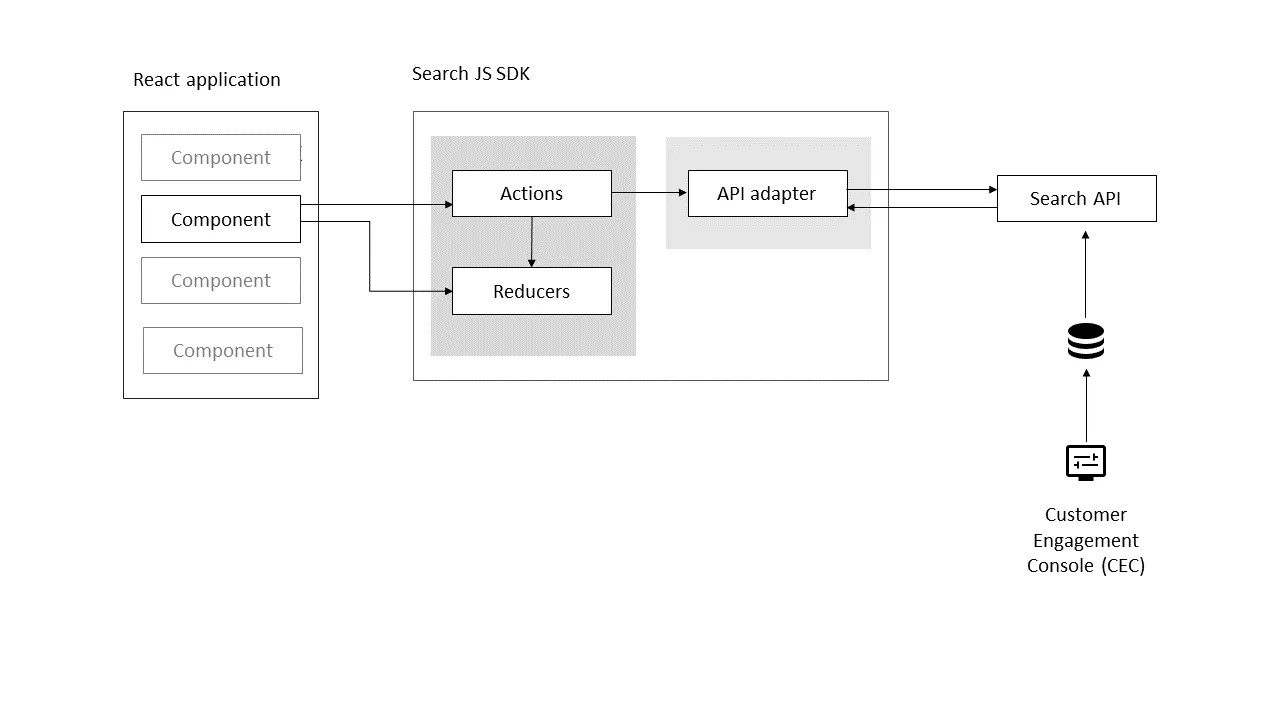
Integrating Sitecore Search with Sitecore Headless is effortless. Imagine setting up a SearchResult component in Sitecore, connecting it to Sitecore Search using the Search JS SDK for React, and effortlessly presenting search results on your frontend!
Sitecore Search will work on any Sitecore version
Sitecore Search can be on any Sitecore version! You can run Sitecore Search on a MVC site! Instead of using the lovely Search JS SDK for React, you can go for the Search and Recommendation API in your backend/MVC view!
Sitecore Search will work everywhere
Sitecore Search is not just for Sitecore sites. It can power mobile apps, Blazor sites, and any other website. Thanks to Search JS SDK for React and Search and Recommendation API 🙂
Sitecore Search is your natural first step when migrating to XM Cloud
Start by migrating all search based content you have today in your Sitecore solution to Sitecore Search. When you are done, the rest of the “migration work” will be easier 🙂
Hallelujah friends, Sitecore Search is our Savior!
Enough with excitements for today 😉
Today’s post will be about Sources in Sitecore Search and how to use them in the lovely Search JS SDK for React.
So what are Sources? Let’s have a look in the documentation:
In Sitecore Search, you index content by creating a source.
https://doc.sitecore.com/search/en/users/search-user-guide/sources.html
A source is a configuration that defines which content you want to make searchable in a Sitecore Search experience. You can configure a source to access content in different locations, such as on a website or in a database, and different formats, such as HTML pages, PDFs, Microsoft Office documents, and JSON objects.
A source can be a crawler that sniffs your website and grab its content and put it in Sitecore Search, or my favourite – API push source. What is that then?
The API push source is a source configuration to create and maintain indexes exclusively for content you push to Sitecore Search. After you configure an API push source, a developer uses the Ingestion API to add documents to the API push source’s index.
https://doc.sitecore.com/search/en/users/search-user-guide/api-push-source.html
Endless Possibilities with Sources
The beauty of sources lies in their flexibility. You can push a diverse array of content into Sitecore Search and then organize it using sources. The potential applications are limitless!
Utilizing Sources in Your Frontend
Wondering how to implement sources in your frontend, especially if you’re working with React or Next.js? Thanks to the Search JS SDK for React, integrating sources into your frontend is remarkably straightforward.
Imagine you’re using the Sitecore Search Starter Kit or, if you’re a Next.js developer, explore the Sitecore Developer Portal. Using sources, you can narrow down your searches to specific content origins. This allows you to set up tailored filter and search result pages per source. Furthermore, empowering editors to choose the source for the search component adds a layer of customization.
Specify your source and then add it to your query object, something like this:
const indexSources = defaultSource?.value.split(',') || [];
---
useSearchResults((query) => {
    query.getRequest()
      .setSources(indexSources );
    return {
      sortType,
      page,
      itemsPerPage,
      keyphrase: defaultKeyphrase,
    };
  });
And that’s it 🙂
Check out latest from Nick Papadogoulas (Mr Sitecore Search himself) – Implementation Tips and Tricks for Sitecore Search
Enjoy Rob Earlam’s great video – Sitecore Search – React SDK
That’s all for now folks 😊
 Visions In Code