
Happy people, I have a small post for you regarding dictionary in Sitecore.
Dictionary is great but sometimes it would be nice to have other text types then just plain text, how about a Rich Text?
Let’s say you have a view with a form where each form element will have a matching label. You are lazy so you put the texts for the labels in a dictionary in Sitecore 😉
Now suddenly the editors want to have html in the label. In this case it’s a typical “confirm” checkbox with a matching label, the label text will contain a link to another page.

You could of course just put the “raw” html in the plain text field but that would be a hack, no?
Instead we should have something like this for the editors:

So how do we do this? Why not extend the current Foundation.Dictionary in the Habitat(Sitecore Modular Architecture Example) and let it support Rich Text field.
First we need to add a new DictionaryEntry template in Sitecore, we will call it DictionaryEntryRichText:

We also need to update the insert options in the Dictionary folder template:
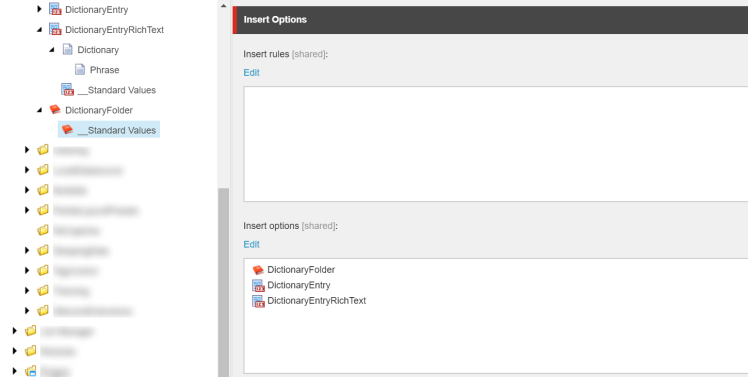
That was the Sitecore part, time to do some coding.
In the class CreateDictionaryEntryService, we will copy the methods and make them support the new template:
public static Item CreateDictionaryEntryRichText(Models.Dictionary dictionary, string relativePath, string defaultValue)
{
  lock (dictionary)
  {
    var parts = relativePath.Split(new[] { '/', '\\' }, StringSplitOptions.RemoveEmptyEntries).ToArray();
    var root = dictionary.Root;
    for (var i = 0; i < parts.Length - 1; i++)
    {
      root = CreateDictionaryFolder(parts[i], root);
    }
    return CreateDictionaryEntry(parts.Last(), root, defaultValue);
  }
}

private static Item CreateDictionaryEntryRichText(string name, Item root, string defaultValue)
{
  using (new SecurityDisabler())
  {
    var item = GetOrCreateDictionaryItem(name, root, Templates.DictionaryEntry.ID);
    using (new EditContext(item))
    {
      item[Templates.DictionaryEntryRichText.Fields.Phrase] = defaultValue;
    }
    return item;
  }
}
Don’t forget to add the new template and it’s field to the Template.cs
Next will be to update the repository class – DictionaryPhraseRepository. Again we will copy some methods and make them support the new template:
public string GetRichText([NotNull] string relativePath, string defaultValue)
{
  if (relativePath == null)
  {
    throw new ArgumentNullException(nameof(relativePath));
  }
  if (Context.Database == null)
  {
    return defaultValue;
  }

  var dictionaryItem = this.GetOrAutoCreateRichTextItem(relativePath, defaultValue);
  if (dictionaryItem == null)
  {
    return defaultValue;
  }

  return dictionaryItem.Fields[Templates.DictionaryEntryRichText.Fields.Phrase].Value ?? defaultValue;
}

private Item GetOrAutoCreateRichTextItem(string relativePath, string defaultValue)
{
  relativePath = AssertRelativePath(relativePath);

  var item = this.Dictionary.Root.Axes.GetItem(relativePath);
  if (item != null)
    return item;

  if (!this.Dictionary.AutoCreate || defaultValue == null)
    return null;
  try
  {
    return CreateDictionaryEntryService.CreateDictionaryEntryRichText(this.Dictionary, relativePath, defaultValue);
  }
  catch (Exception ex)
  {
    Log.Error($"Failed to get or create {relativePath} from the dictionary in site {this.Dictionary.Site.Name}", ex, this);
    return null;
  }
}
Don’t forget to update the interface class with the new method – IDictionaryPhraseRepository
Finally we will add new extension methods in the SitecoreExtensions.cs class in Foundation.Dictionary.Extensions:
public static HtmlString DictionaryRichTextField(this SitecoreHelper helper, string relativePath, string defaultValue = "")
{
  var item = DictionaryPhraseRepository.Current.GetItem(relativePath, defaultValue);
  if (item == null)
    return new HtmlString(defaultValue);
  return helper.Field(Templates.DictionaryEntryRichText.Fields.Phrase, item);
}

public static string DictionaryRichText(this SitecoreHelper helper, string relativePath, string defaultValue = "")
{
  return DictionaryPhraseRepository.Current.GetRichText(relativePath, defaultValue);
}
And in the view we will put our new DictionaryRichText to use:
<div class="form-group form-check @Html.ValidationErrorFor(model => model.ConfirmRegistration, "has-error")">

  @Html.CheckBoxFor(x => x.ConfirmRegistration, new
  {
      @class = "form-check-input"
  })

  <label class="form-check-label" for="ConfirmRegistration">
    @Html.Raw(Html.Sitecore().DictionaryRichText("/MyForm/RichTextTest", "This is a rich text"))
  </label>

</div>

That’s all for now folks 🙂
 Visions In Code
One thought on “Adding Rich Text to your dictionary in Sitecore”